REPOST meaning TikTok is one of the most searched TikTok features because many users notice videos appearing on their friends’ feeds with a small Reposted label. If you’ve ever wondered what repost means on TikTok, how to repost a TikTok video, or who can see your reposts, you’re not alone.
The repost feature has become an important part of how people share content on TikTok without uploading it themselves. Instead of sending videos through direct messages, users can repost videos they enjoy so their followers are more likely to discover them.
In this guide, you’ll learn everything about REPOST meaning TikTok, including how it works, why people use it, how to undo a repost, common myths, privacy concerns, and tips for using the feature effectively.
What Does REPOST Mean on TikTok?
A repost on TikTok means sharing someone else’s TikTok video with your followers without uploading it to your own profile.
Think of it as the TikTok version of:
- Sharing a Facebook post
- Retweeting on X (formerly Twitter)
- Reposting on Instagram Stories
Instead of creating a duplicate video, TikTok simply recommends that video to people who follow you.
For example:
- Your friend uploads a funny cooking video.
- You love it and tap Repost.
- Your followers may now see that video in their For You feed with a note saying that you reposted it.
The original creator still receives all the views, likes, comments, and credit.
What Is the TikTok Repost Feature?
TikTok introduced the repost feature to make sharing videos easier.
Before reposts existed, people usually shared videos by:
- Copying the link
- Sending videos through direct messages
- Sharing them outside TikTok
Now users can recommend videos directly inside the app.
The feature encourages:
- Content discovery
- Community engagement
- Creator support
- Viral sharing
Unlike uploading someone else’s video, reposting keeps the original content connected to its creator.
How Does the TikTok Repost Feature Work?
The process is very simple.
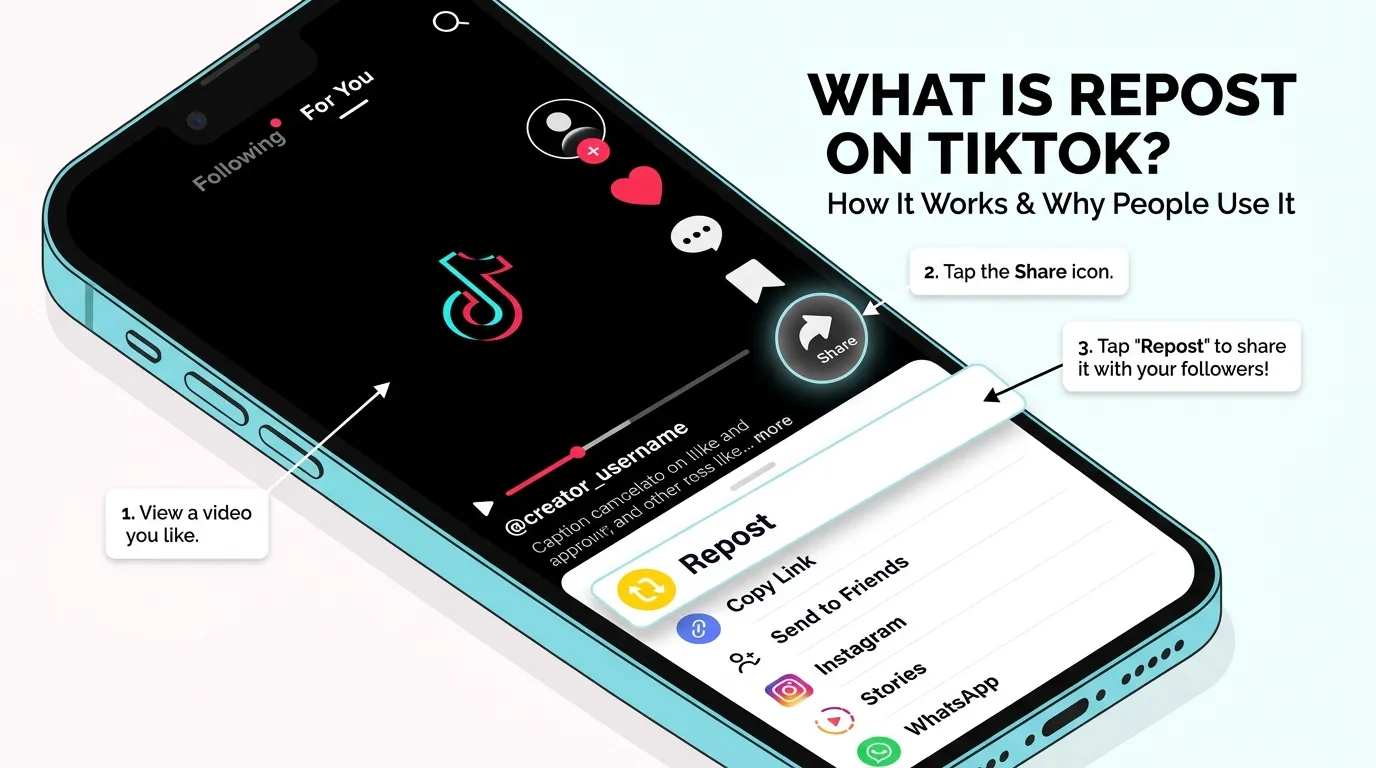
When you repost a video:
- Open a TikTok video.
- Tap the Share arrow.
- Select Repost.
- TikTok immediately shares your recommendation.
The video may appear in your followers’ feeds with a small message such as:
Tom reposted this video.
The video itself remains on the original creator’s account.
How to Repost a Video on TikTok
Follow these steps:
Step 1
Open TikTok.
Step 2
Find a video you enjoy.
Step 3
Tap the Share button.
Step 4
Choose Repost.
Step 5
Optionally add a comment explaining why you’re sharing it.
That’s all.
The repost happens instantly.
How to Undo a Repost on TikTok
Accidentally reposted something?
No problem.
Here’s how to remove it:
- Open the reposted video.
- Tap the Share button again.
- Select Remove Repost.
The repost disappears immediately.
Your followers will no longer see your recommendation.
Who Can See Your TikTok Reposts?
This is one of the biggest questions users ask.
Generally, your reposts may be seen by:
- People who follow you
- Mutual friends
- Users TikTok believes may enjoy the content
Depending on TikTok’s algorithm, not every follower will see every repost.
The visibility depends on:
- User activity
- Interests
- Engagement
- TikTok recommendations
Where Do Reposted Videos Appear?
Many users expect reposted videos to appear on their own profile.
That’s not how TikTok works.
Instead, reposted videos mainly appear:
- Inside followers’ For You feeds
- As recommended content
- Occasionally in a dedicated repost section (depending on app version)
They are not uploaded as your own videos.
Why Do People Repost Videos?
People repost videos for many reasons.
To Share Interesting Content
Users love recommending funny, educational, or inspiring videos.
To Support Creators
Reposting helps creators gain:
- More views
- More followers
- Better engagement
To Start Conversations
A repost often encourages friends to discuss a topic.
To Save Time
Instead of sending the same video individually to multiple friends, reposting shares it with everyone.
To Build Communities
People often repost videos related to:
- Sports
- Gaming
- Fashion
- Books
- Movies
- Technology
- Fitness
Does Reposting Give You Credit?
No.
The original creator keeps all the credit.
That includes:
- Views
- Likes
- Shares
- Comments
- Video ownership
Your repost simply tells TikTok that you recommend the content.
Does Reposting Increase Views?
Yes, it often can.
Although TikTok has never fully explained the algorithm, reposting may help videos reach more users.
More reposts can lead to:
- Increased exposure
- Higher engagement
- Additional recommendations
- Better chances of going viral
However, reposting alone does not guarantee viral success.
Can Everyone Repost Videos?
Not always.
Some videos cannot be reposted because:
- The creator disabled reposts.
- TikTok limits sharing on certain content.
- Regional restrictions apply.
- The account has privacy settings enabled.
If you don’t see the repost button, the feature may not be available for that video.
Why Can’t I Find the Repost Button?
There are several possible reasons.
The Feature Isn’t Available
TikTok rolls out features gradually.
Your App Needs Updating
Install the latest version.
The Creator Disabled Reposts
Some creators prefer not to allow reposting.
Account Restrictions
Certain account settings may limit available features.
TikTok Repost vs Share: What’s the Difference?
| Feature | Repost | Share |
|---|---|---|
| Appears to followers | Yes | No |
| Sends directly to friends | No | Yes |
| Original creator gets credit | Yes | Yes |
| Visible in feed | Usually | No |
| Promotes discovery | Yes | No |
Sharing privately sends a video to specific people.
Reposting recommends it publicly to your followers.
TikTok Repost vs Download
Many people confuse these features.
Repost
- Shares the original video
- Creator keeps ownership
- No duplicate upload
Download
- Saves the video
- Stores it on your device
- Does not recommend it to followers
These are completely different actions.
Benefits of Using the TikTok Repost Feature
Using reposts wisely has several advantages.
Discover New Communities
You can introduce followers to creators they might never have found.
Support Small Creators
A simple repost may significantly increase a creator’s visibility.
Keep Your Followers Entertained
Share interesting videos without creating new content.
Build Engagement
Followers may interact with reposted videos and start conversations.
Common Misunderstandings About TikTok Reposts
Many myths exist about reposting.
Myth 1: Reposting Steals Videos
False.
The original creator keeps ownership.
Myth 2: Reposting Uploads the Video to Your Profile
False.
The video stays on the creator’s account.
Myth 3: Everyone Sees Every Repost
False.
TikTok’s algorithm decides who may see reposted videos.
Myth 4: Reposts Count as Your Own Content
False.
They are recommendations, not uploads.
Myth 5: Reposting Automatically Makes Videos Viral
False.
Reposts help increase visibility but don’t guarantee success.
Tips for Using TikTok Reposts Effectively
Want your reposts to be useful?
Follow these tips.
- Repost videos you genuinely enjoy.
- Avoid reposting misleading content.
- Support original creators.
- Add thoughtful comments when possible.
- Don’t spam your followers with excessive reposts.
- Share educational, entertaining, or inspiring videos.
- Keep your reposts relevant to your interests.
Quality always matters more than quantity.
Examples of TikTok Reposts
Here are some everyday examples.
Example 1
A student reposts a study hack video before exams.
Example 2
A fitness enthusiast reposts a workout routine.
Example 3
A gamer reposts a funny gaming clip.
Example 4
A chef reposts a cooking tutorial.
Example 5
A traveler reposts a destination guide.
Each repost helps introduce useful content to new audiences.
Related TikTok Terms You Should Know
Understanding these terms will make TikTok easier to use.
| Term | Meaning |
|---|---|
| FYP | For You Page |
| Duet | Create a split-screen video with another creator |
| Stitch | Use part of another creator’s video in your own |
| Share | Send a video privately or externally |
| Save | Bookmark a video for later |
| Like | Show appreciation for content |
| Follow | Subscribe to a creator’s updates |
Best Practices for Content Creators
If you’re a creator, reposts can help your content grow.
Encourage viewers to:
- Repost helpful videos.
- Share tutorials.
- Recommend entertaining clips.
- Engage through comments.
- Follow for similar content.
Creating valuable, informative, or entertaining videos naturally increases the likelihood of reposts.
Is Reposting Safe?
Yes.
The repost feature is an official TikTok function.
Still, users should:
- Respect community guidelines.
- Avoid spreading misinformation.
- Verify facts before reposting.
- Think before recommending sensitive content.
Responsible reposting creates a better experience for everyone.
Frequently Asked Questions
What does REPOST mean on TikTok?
A repost is a way to recommend someone else’s video to your followers without uploading it to your own profile. The original creator keeps full credit for the content.
Can people see if I repost a TikTok?
Yes. Your followers or other users may see a label indicating that you reposted the video, depending on how TikTok distributes it through its algorithm.
Does reposting a TikTok notify the creator?
TikTok’s features can change over time, but reposting primarily increases the video’s visibility. Any creator notifications may depend on the current version of the app and its notification settings.
Can I remove a repost?
Yes. Open the video, tap Share, and choose Remove Repost. The recommendation will be removed.
Why don’t I have the repost button?
The feature may not be available because the creator disabled reposting, your app needs updating, or TikTok hasn’t enabled the feature for your account or region yet.
Does reposting help videos go viral?
Reposts can increase a video’s exposure by recommending it to more viewers. However, factors like watch time, engagement, and TikTok’s recommendation algorithm also play major roles in whether a video goes viral.
Are reposts the same as sharing?
No. A share sends a video directly to specific people or external platforms, while a repost recommends the video to your followers within TikTok.
Final Thoughts
Understanding the REPOST meaning TikTok helps you get more out of the platform, whether you’re a casual viewer or an aspiring creator. Reposting is an easy way to recommend videos you enjoy while ensuring the original creator receives full credit and engagement. Unlike uploading someone else’s content, reposts simply boost discovery and make it easier for your followers to find valuable, entertaining, or inspiring videos.
If you use the feature thoughtfully—sharing high-quality content, supporting creators, and avoiding excessive reposting—you can contribute to a more engaging TikTok community. As TikTok continues to evolve, staying familiar with features like reposts will help you navigate the platform more effectively and make the most of your social media experience.